You can manage users by yourself in your hintcatcher system. Using the usermanagement, you can add further case workers to your hintcatcher system and manage user roles.
- There are two roles in hintcatcher: “Case-Worker” und “Administrator”.
- Both roles have access to all cases in your hintcatcher system and can work with all cases.
- The “Administrator” role can - compared to the Case-Worker - additionally configure general settings of your system.
Invite additional case workers to your hintcatcher system
- In case management, switch to the “Usermanagement” page
- You will see an overview of all current users in the system
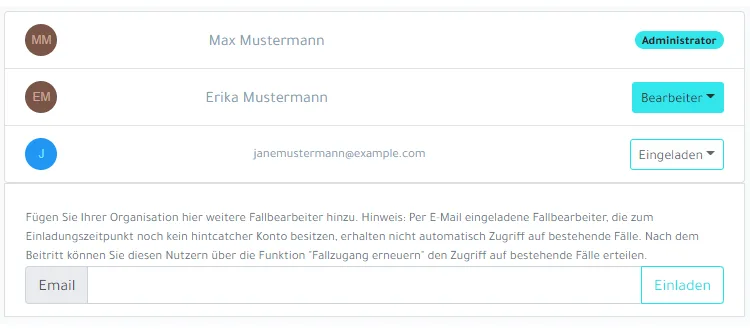
- Enter the email address of the case worker whom you would like to invite into your hintcatcher system in the field for inviting additional case workers. Please make sure that the e-mail address exactly matches the e-mail address with which the respective case worker registers in hintcatcher.
- Click the “Invite” button
The user / email address is now displayed as invited in the overview of users.
Please note that newly invited users will initially not have access to existing cases in your hintcatcher system due to the end-to-end encryption of the hint data. They can see the cases in the system, but cannot open them.
After an invited user has joined your hintcatcher system, you as an administrator case worker or another administrator case worker with case access must restore case access for the new user (refresh case access) so that they can access existing cases in your hintcatcher system. Please refer to the information and instructions in this article.
Change the role of a user
- In case management, switch to the “Usermanagement” page
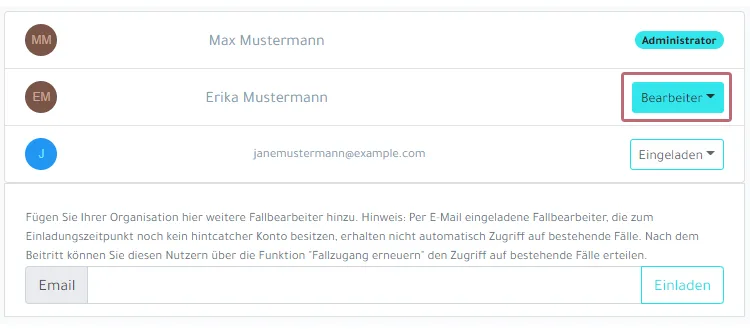
- Open the dropdown menu of the user whose role you want to change:
- Select the desired option “Make administrator” / “Make Case-Worker” to change the role of the user:
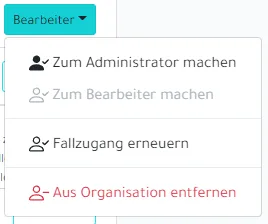
The updated role is displayed next to the user in the overview.
Removing a user from your hintcatcher system
Before removing a case worker from your hintcatcher system, please ensure that your user account has access to all cases in your hintcatcher system.
If your user account does currently not have access to all cases in your hintcatcher system, you should first have case access restored by another administrator case worker (refresh case access) before removing a case worker. Otherwise access to some/all cases may be irretrievably lost due to the end-to-end encryption of the cases. Please note the information and instructions in this article.
- In case management, switch to the “Usermanagement” page
- Open the dropdown menu of the user who you want to remove from your system:
- Wählen Sie die Option “Aus Organisation entfernen”, um den Benutzer aus Ihrem hintcatcher System zu entfernen:
The user will be removed from your hintcatcher system and will no longer have access to case management.